

Three Permission Tiers, Not Just a Toggle
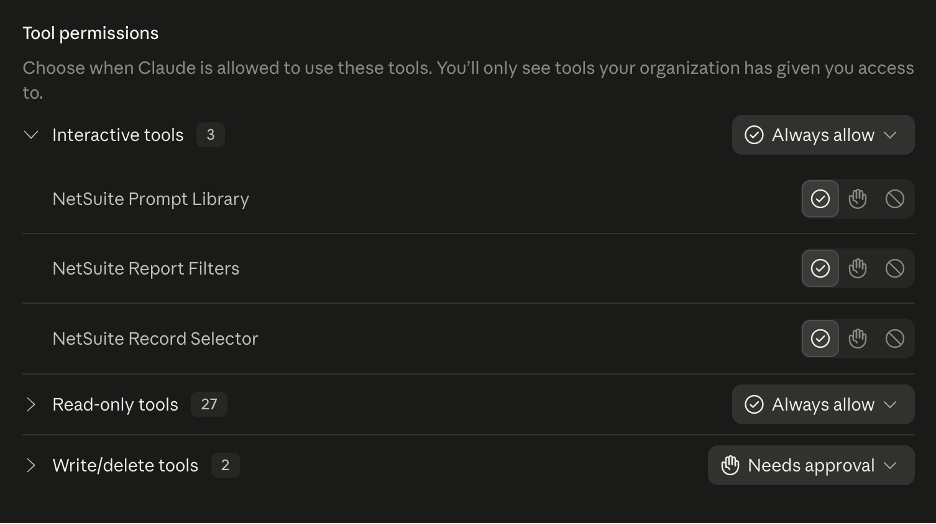
Before the tools themselves, it’s worth understanding how access is structured, since this is the part that makes the whole setup feel safe rather than reckless. Every tool falls into one of three tiers, each independently controllable:
- Interactive tools (3 in a standard setup): NetSuite Prompt Library, NetSuite Report Filters, NetSuite Record Selector. These are UI-assist tools, they help Claude ask you clarifying questions rather than guessing.
- Read-only tools (27): everything from looking up a customer’s balance to running a saved search. These can be set to “Always allow” safely, since nothing here changes data.
- Write/delete tools (2): Create Record and Update Record. These default to “Needs approval,” meaning Claude has to ask before it actually changes anything in your account. Worth leaving this on approval-required rather than always-allow, even once you trust the setup.
That three-way split is worth explaining to anyone on your team nervous about “letting an AI touch NetSuite.” It can look up almost anything freely, but it can’t change or delete a record without you explicitly saying yes in the moment.
Read-Only Tools: What to Actually Ask
This is the bulk of what you’ll use day to day.
A few real examples per group:
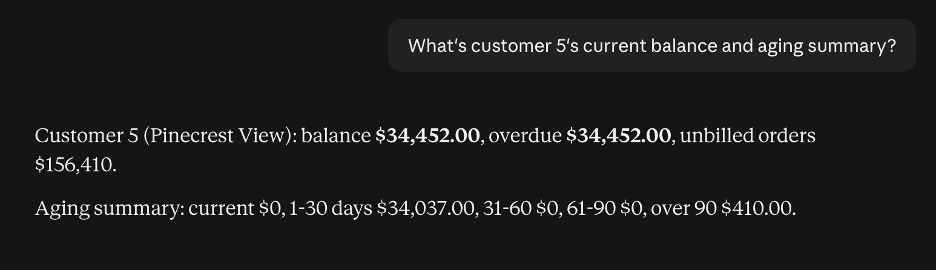
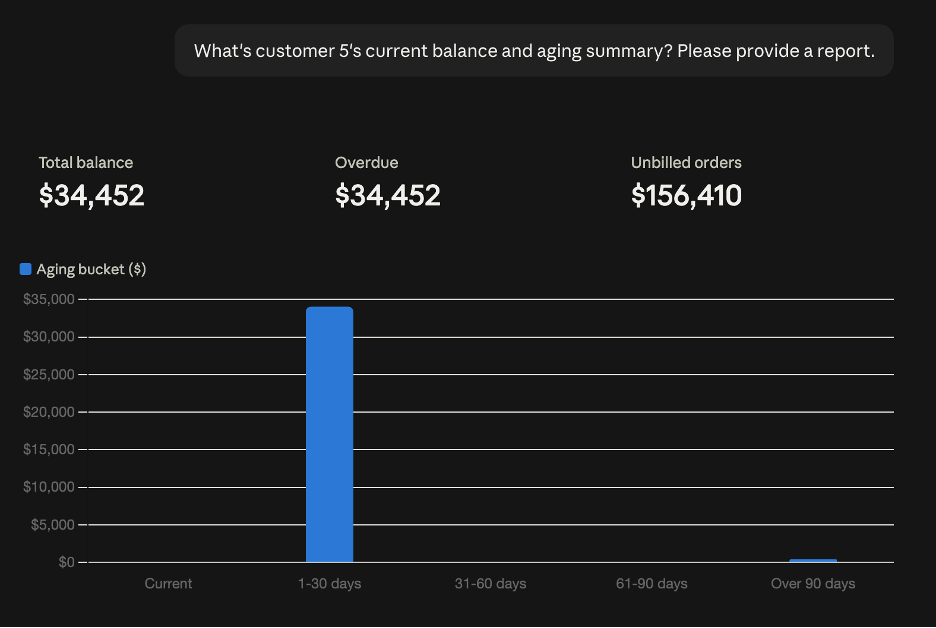
Customer and balance lookups (Get Customer Balance, Get Customer Details, Get Customer Transactions, Search for Customers):
- “What’s customer 836’s current balance and aging summary?”
- “Show me the last five transactions for customer 45”
- “Search for customers in California with no activity in the last 90 days”
Financial and sales reporting Get Financial Performance, Generate Sales Report, Get Sales Order, Get Sales Order With Filters):
- “What’s the financial performance from 1/1/2026 to 6/30/2026?”
- “Show me sales orders over $10,000 from last quarter”
- “Pull up sales order SO-114, what’s on it?”
Saved searches and SuiteQL (List Saved Searches, Run Saved Search, Run Custom SuiteQL, Get SuiteQL Metadata):
- “Run my saved search for open sales orders”
- “Query all invoices from June that are still unpaid”
- “What columns are available on the transaction table?”
Reference and metadata (Get Subsidiaries, Get Nexus IDs, Get Accounting Book IDs, Get Record Type Metadata, List All Reports):
- “What subsidiaries do we have set up?”
- “What accounting books are available for reporting?”
- “List the reports I have access to run”
Inventory and items (Check Inventory Levels, Get Item Details):
- “What’s the inventory level for SKU-4521?”
- “Give me the details on item 1102”
Write/Delete Tools: Use Sparingly, Approve Deliberately
Create Record and Update Record are the two tools that actually change data, and they’re the ones worth being most intentional about.
- “Create a new contact for customer 836 named Jane Doe, email jane@example.com” (Claude will ask for confirmation before this executes)
- “Update the phone number on customer 112 to 555-0142” (same, requires your approval in the moment)
Leave these on “Needs approval” rather than “Always allow,” even after you’ve used the connector for a while. The read-only side of this toolset is where almost all the daily value lives, there’s rarely a good reason to skip the approval step on anything that writes.
A Few Practical Notes
Be specific about date ranges and IDs. “Show me recent sales” is vague enough that Claude has to guess at scope. A specific date range or customer ID gets a faster, cleaner answer.
Name the tool explicitly if you know which one you want. If a question could match two tools, being direct (“use Get Customer Balance for customer 836”) avoids ambiguity, especially once you’ve got custom tools installed alongside the native ones.
Start broad, then narrow. Ask for the account-wide picture first, then follow up scoped to what you actually care about, no need to front-load every filter into one giant question.
Quick Reference
A scannable list of the tools covered above, for whenever you need a reminder of what’s available without rereading the whole post.
|
Tool
|
Tier
|
What It Does
|
|---|---|---|
|
Get Customer Balance
|
Read-only
|
Balance and aging breakdown for a customer
|
|
Get Customer Details
|
Read-only
|
Customer record details
|
|
Get Customer Transactions
|
Read-only
|
Recent transaction history for a customer
|
|
Search for Customers
|
Read-only
|
Find customers by criteria
|
|
Get Financial Performance
|
Read-only
|
Financial summary for a date range
|
|
Generate Sales Report
|
Read-only
|
Sales report generation
|
|
Get Sales Order
|
Read-only
|
Single sales order lookup
|
|
Get Sales Order With Filters
|
Read-only
|
Sales orders matching criteria
|
|
List Saved Searches
|
Read-only
|
Lists available saved searches
|
|
Run Saved Search
|
Read-only
|
Executes a saved search
|
|
Run Custom SuiteQL
|
Read-only
|
Runs an ad hoc SuiteQL query
|
|
Get SuiteQL Metadata
|
Read-only
|
Table/column reference for SuiteQL
|
|
Get Subsidiaries
|
Read-only
|
Lists account subsidiaries
|
|
Get Nexus IDs
|
Read-only
|
Lists tax nexus records
|
|
Get Accounting Book IDs
|
Read-only
|
Lists accounting books
|
|
Get Record Type Metadata
|
Read-only
|
Field/structure reference for a record type
|
|
List All Reports
|
Read-only
|
Lists reports available to run
|
|
Check Inventory Levels
|
Read-only
|
Inventory levels by item
|
|
Get Item Details
|
Read-only
|
Item record lookup
|
|
NetSuite Prompt Library
|
Interactive
|
Pre-built prompt templates
|
|
NetSuite Report Filters
|
Interactive
|
Guided report filter selection
|
|
NetSuite Record Selector
|
Interactive
|
Guided record picker
|
|
Create Record
|
Write/Delete
|
Creates a new record (requires approval)
|
|
Update Record
|
Write/Delete
|
Updates an existing record (requires approval)
|
The native toolset covers more ground than most people realize after connecting it for the first time, customer lookups, financial summaries, saved searches, ad hoc SuiteQL, and reference data are all one plain-language question away from Claude. Spend a week just asking natural questions against the read-only tools before reaching for anything custom, there’s a good chance the thing you were about to build already exists under a name you hadn’t thought to ask for yet.
How TAC Can Help
Connecting Claude to NetSuite is just the beginning. Getting real value from it means making sure the right tools are available, permissions are configured correctly, and your team knows how to use them effectively.
At TAC Solutions Group, we help businesses take AI integrations beyond the initial setup. Whether you’re looking to connect Claude to NetSuite, build custom MCP tools for processes the native tools don’t support, or explore opportunities to automate everyday tasks, our consultants can help you identify what’s possible and implement a solution that fits your business.
Ready to get more out of Claude and NetSuite? Talk to a TAC consultant to discuss your environment and how we can help you put AI to work.