

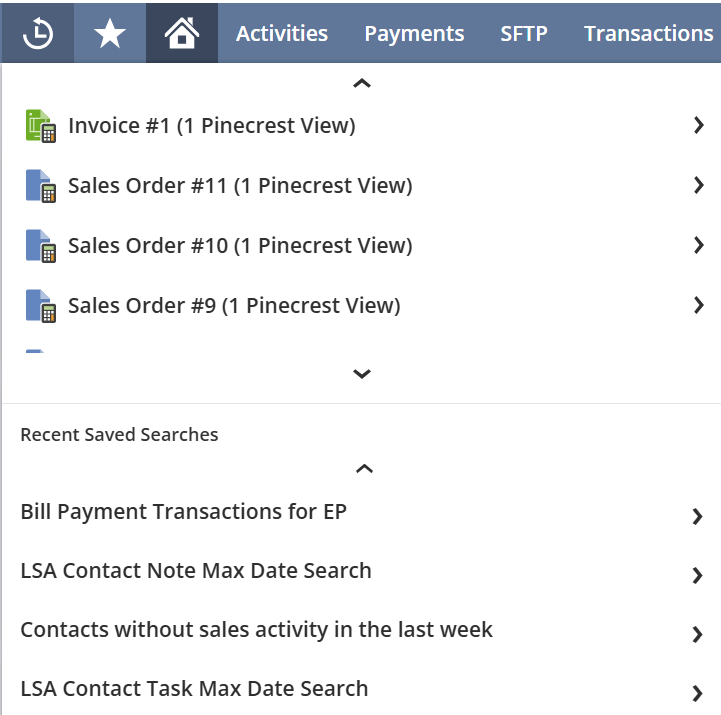
NetSuite provides a really helpful feature in the navigation menu called Recent Records. It gives you access to all the records you’ve opened in order of when you last accessed them, and since it’s part of the menu, you can access it from anywhere within your NetSuite account. However, have you ever noticed that it doesn’t include any saved search you’ve recently opened? For years I’ve been opening Recent Records to look for a saved search I was recently working with only to remember yet again that the Recent Records feature does not include saved searches.
The good news is that now there’s a solution to this problem. We’ve developed a Chrome extension that adds a Recent Saved Searches section to the bottom of the NetSuite Recent Records menu. With this extension you’ll be able to navigate back to any saved search you have recently opened. You can also open the saved search in edit mode by navigating to the Edit link on the right just like the links in Recent Records.

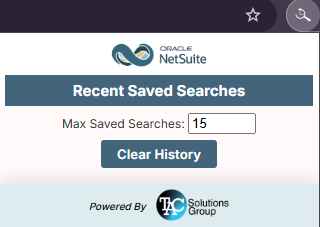
We’ve also included two options that are configurable in a popup when you click on the icon for the extension in the extensions toolbar on your Chrome browser. One option is the maximum number of searches that are stored on the menu so you can show as little or as many recent searches as you like. The other option is the Clear History option that allows you to clear all your recent saved searches and start over again.
Saved searches are one of the most powerful tools in NetSuite, and now getting back to them is just as easy as getting back to any other record. If this extension sounds useful to you, you can find the download link below. Give it a try and see how much time it saves you.
How TAC Can Help
Saved searches are one of the most powerful tools in NetSuite—but when they’re difficult to access quickly, productivity takes a hit. At TAC Solutions Group, we focus on making NetSuite work better for your team every day.
Our experienced NetSuite consultants identify workflow gaps and implement practical solutions—like the Recent Saved Searches Chrome Extension—to improve usability and efficiency.
And our expertise doesn’t stop there. TAC supports businesses across all areas of NetSuite, including implementations, customizations, integrations, automation, reporting strategy, system optimization, troubleshooting, and ongoing support.
Whether you need to enhance a single workflow or transform your entire NetSuite environment, TAC delivers solutions that simplify processes, eliminate friction, and help your team move faster with confidence.